SID - Import Lookup Table
ACCESS THE CUSTOM STEP FOLDER
Description
The custom step enables SAS Studio users to import and activate a lookup table for SAS Intelligent Decisioning (SID) from input data, using DCM_IMPORT_LOOKUP macro. The macro DCM_IMPORT_LOOKUP (part of SID) uses the lookup table name and folder path name to determine whether a lookup table already exists. If the lookup table already exists, then it is updated. If either the path name or lookup table name does not exist, it is created.
User Interface
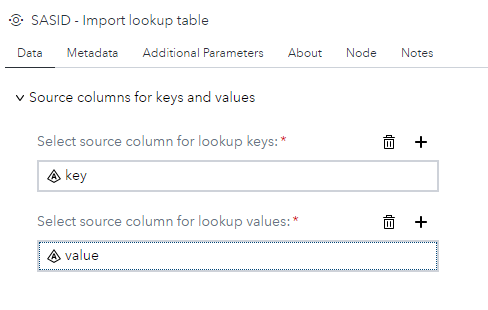
Data tab
- From input table, select a column for the lookup table keys (required).
- From input table, select a column for the lookup table values (required).
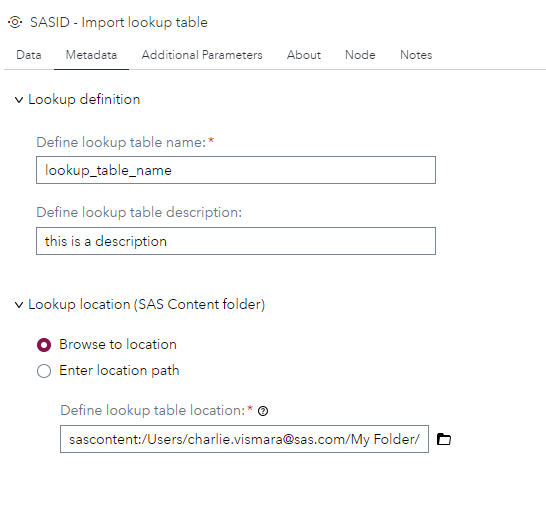
Metadata tab
- Define a name for your lookup table (required).
- Define a description for your lookup table (optional).
- Define a location on the sas content for your lookup table (required). --> the location path can be browsed or defined by a string or a macro variable.
Additional Parameters tab
- Activate or not the lookup table. By default, this option is checked.

Requirements
- Tested on Viya version Stable 2024.12.
- Requires : SAS® Intelligent Decisioning 5.4 or higher.
- Uses : DCM_IMPORT_LOOKUP macro (https://go.documentation.sas.com/doc/en/edmcdc/default/edmmacro/n0ni2e3h31k5x3n1v1w4e46z7rnh.htm)
- Uses :
<viyahost>/folders/paths REST API(https://developer.sas.com/rest-apis/folders/findByPath)
Usage
- Can be used in a flow or in stand alone.

- Require an input data set with valid columns for keys and values.
Change Log
- Version 1.0 (07FEB2025)
- Initial version