Register Pickle File to Model Manager
Description
The Register Pickle File to Model Manager custom step registers pickled Python models — scikit-learn, or anything exposing the same predict/predict_proba/classes_ interface (including XGBoost's and LightGBM's scikit-learn wrappers) — trained entirely outside SAS, into SAS Model Manager, without writing any Python or sasctl code yourself.
Point the step at up to four pickled models (classification or regression) and training data — either a CSV, or a table already in Viya connected as an input port — and it will:
- Auto-detect predictor columns from each model's own trained feature list (or let you specify them explicitly), and auto-detect whether each model is classification or regression/prediction directly from the pickle itself
- Handle binary and multiclass classification, as well as regression/prediction models, in the same batch
- Generate the information Model Manager needs about the model’s inputs and outputs, along with model properties and governance/lineage metadata (who registered it, when, the framework, and the model's hyperparameters)
- Optionally generate a full model card, including honest held-out metrics if an evaluation dataset is supplied, and an optional bias/fairness assessment against a sensitive column
- Create the target Model Manager project if it doesn't already exist, or register into an existing one
- Optionally publish the imported model(s) to an existing Viya publishing destination, verifying the destination exists before doing any work, and confirming the publish job actually completed rather than just submitting it
- Optionally set up performance monitoring for the imported model(s), once published
Up to four models share one training table, one target column, and one project — so a single run of the step can recreate a typical "compare several algorithms on the same problem" workflow (e.g. a decision tree, a random forest, and a gradient boosting model, all predicting the same target) entirely from the UI.
Models are picked up either from a SAS Content location or directly from the compute server's filesystem — the step stages SAS Content files into WORK automatically before reading them.
Requirements
SAS Viya and model compatibility
- Tested on Viya Stable 2026.09.
- Tested with scikit-learn models. Other scikit-learn-API-compatible libraries (e.g. XGBoost and LightGBM) are expected to work but have not yet been verified; broadening tested coverage is planned.
Python environment
The step runs its Python code in the SAS Studio compute session's proc python block. These packages must already be available in that session's Python environment; the step does not install them:
sasctl(including thepzmmsubmodule)pandasscikit-learnswatandcertifiif you use the SAS Content file picker or performance monitoring. Those features upload data directly to CAS and use SWAT's SSL certificate configuration. These packages are not needed forsasserver:-style paths when neither feature is used.
Optional feature configuration
- Publishing: Choose a publishing destination that’s already set up in Viya. Creating one is an admin-only operation and is outside the scope of this step.
- Performance monitoring: This option requires Publish to be enabled, because Model Manager scores the published model to compute performance. The step creates the performance definition but does not run it. Run it from the project's Performance tab instead: results are written to a Model Manager library shared across projects, and leftover results from a previous job that didn’t finish anywhere on the server can cause a "target table ... already exists" error. The step cannot detect or clean up leftover results; running the job from Model Manager keeps the failure retryable and separate from the step run.
User Interface
-
Input Parameters
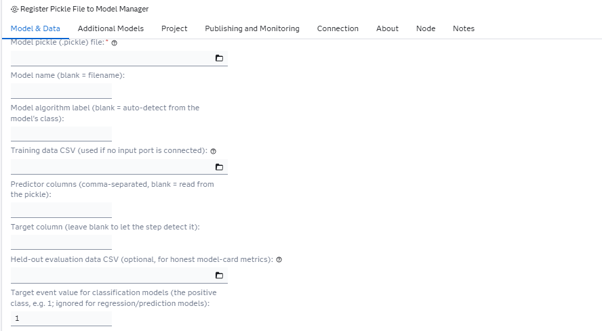
The core inputs:
- The first model's pickle file
- An optional name and algorithm label (auto-detected from the model's class if left blank)
- Training data: connect a table already in Viya (CAS-backed or a classic SAS library) as an input port, or a training data CSV if nothing's connected to the port
- Optional explicit predictor columns. Leave blank to read them from the pickle; only the model's own inputs are registered, not every column in the training table. A model trained on a NumPy array (
.values) stores no column names, so enter its columns here, in training order. - The target column: enter it, or leave it blank to let the step detect it (if more than one column could be the target, the step asks you to enter it)
- An optional held-out evaluation dataset for honest model-card metrics
- For classification models only: which class value is the target "event" (whether each model is classification or regression/prediction is detected automatically from the pickle; there's no field for it)
-
Additional Models
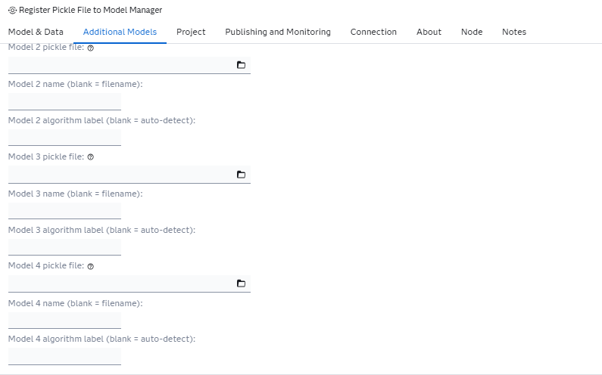
Optionally, up to three more models, each sharing the same training table, target, and project as the first model:
- Pickle file
- Name
- Algorithm label
-
Project
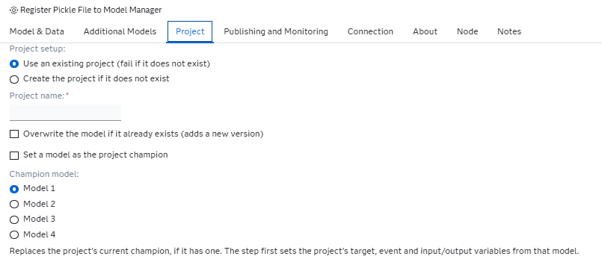
Whether to require an existing project or create one if it's missing, the project name, and whether re-running should replace a model with the same name.
Optionally, set one of the models as the project champion. The step first sets the project's target, event, training table and input/output variables from that model, then makes it champion. This replaces the project's current champion, if it has one.
-
Publishing and Monitoring
A model card is generated for binary classification and regression/prediction models (multiclass models are skipped); optionally give a sensitive column for a bias/fairness assessment (classification only).
Whether to publish the imported model(s), and the name of the (already-existing) Viya publishing destination to publish to. The destination is verified up front — the step fails immediately with a clear message (and the list of destinations that do exist) if it can't find the one you named, rather than partway through the run.
You can also lock the published version instead of creating a new one, so the model card shows the version that was published (Viya 2025.03 or later; on older releases the step falls back to Model Manager's default of creating a new version, and says so in the log).
Also whether to set up performance monitoring for the imported model(s) — binary classification and regression/prediction models only, multiclass models are skipped — and which CAS library to upload the monitoring input table to (default
Public). This requires Publish to be checked too: SAS Model Manager scores each model itself to compute performance, so the model has to already be published for that to work. This option configures the project's Model Evaluation properties, uploads a monitoring input table, and creates the performance definition, including drift-alert thresholds set automatically to SAS's recommended defaults — it deliberately does not run the performance job itself (see Requirements above for why). Once the step finishes, open the project's Performance tab in Model Manager and click Run on the definition it created.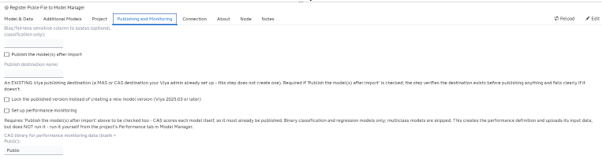
-
Connection
An optional explicit Viya host, only needed if the step can't derive one automatically from the SAS Studio session it's running in.

-
About
General description of the step, plus collapsible Prerequisites and Documentation sections and an expanded Change Log section showing the current version — kept in sync with the Requirements and Change Log sections of this README.

Usage
The step needs a training table (a table connected to its input port, or a CSV) and one or more pickled scikit-learn models trained on it. A quick way to produce a model from data already available in your Viya environment:
-
Export
SASHELP.CARSto CSV (or use any tabular dataset with numeric predictors and a target column). -
In a Python environment (SAS Studio's PROC PYTHON works), train a simple scikit-learn model against it and pickle the result, e.g.:
import pickleimport pandas as pdfrom sklearn.ensemble import RandomForestRegressorfrom sklearn.model_selection import train_test_split# Load the CSV exported in step 1cars = pd.read_csv("cars.csv")cars = cars.dropna(subset=["EngineSize", "Cylinders"]) # CARS has a few missing values# Keep X as a DataFrame, not .values, so the pickle remembers its column namesX = cars[["EngineSize", "Cylinders"]]y = cars["Horsepower"]X_train, X_test, y_train, y_test = train_test_split(X, y, test_size=0.3, random_state=42)model = RandomForestRegressor(random_state=42).fit(X_train, y_train)print("R-squared on the held-out rows:", model.score(X_test, y_test))with open("model.pickle", "wb") as f:pickle.dump(model, f)Use a regressor for a continuous target like
Horsepower. A classifier needs a target with a few classes (e.g. a 0/1 column); on a continuous target it becomes a multiclass model with one class per distinct value. -
Upload
model.picklesomewhere SAS Studio's file picker can reach it (a SAS Content folder, or a path on the compute server). Do the same with the CSV if you'll use it as the training table. -
Add the Register Pickle File to Model Manager step to a flow, connect
SASHELP.CARSto its input port (or point it at the CSV), choose the pickle, enter the target column (Horsepowerhere, because CARS has several columns the step can't choose between), and run it. -
Check SAS Model Manager — the project (created if it didn't exist) should now contain the registered model and its model card.
The log ends with a summary showing whether each part succeeded (OK), was skipped (SKIP, e.g. no model card for a multiclass model) or failed (ERR), so a problem with one model in a multi-model batch is easy to spot without blocking the rest.
Running it without the step's UI
extras/Register Pickle File to Model Manager.sas contains the exact same logic as the custom step, with the UI fields exposed as %let statements at the top instead. Fill those in and submit the file directly in a SAS Studio Program tab (or any batch/scheduled SAS session) to run it without importing the custom step — useful for repeated or scripted runs. The training-data input port is a Flow-only feature (it depends on the Flow Designer's own port resolution), so this standalone script always reads training data from the CSV %let.
Change Log
- Version 1.27 (04NOV2026)
- Step first made available on GitHub.
The detailed development history is in extras/CHANGELOG.md.