FTP Download Files
Description
The "FTP Dowload Files" custom steps lets you download files from an FTP server, based on an input table containing the directory and filename.
SAS Viya version Support
Created and tested on Viya 4, Stable 2023.01
Important
- The transfer mode is always binary.
- The custom step is created and tested for an FTP server installed on Linux.
- The output table only contains files that are downloaded successfully.
User Interface
Tab: Properties
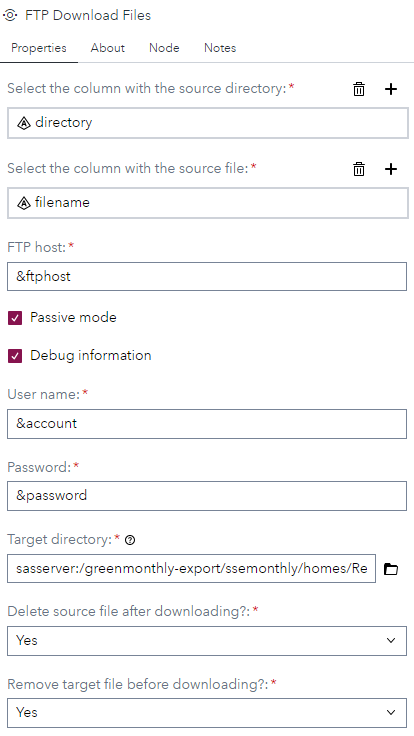
- directory column: Select the source table column that contains the FTP directory from which you want to download one or more file from.
- filename column: Select the source table column that contains the file name(s), in the specified FTP directory, you want to download.
- FTP Host: Specifiy the FTP host name or IP address. As you can see, this also can be a macro variable which can be defined, for example, in an initialization script.
- Passive mode: Specifies that the transfer mode to the FTP server is passive.
- Debug Information: Here you can set the debug option where the complete process is logged.
- User name: Specifies the user name with which you want to connect to the FTP server.
- Password: The password for the user name with which you want to connect to the FTP server. Note that here you can use a SAS encrypted password.
- Target directory: Specify the physical target/client directory.
- Delete source file after download: Here you can specify that a source file needs to be deleted after it has been downloaded. The default value is No.
- Delete target file before download: Here you can specify that a target file needs to be delete before a new version is downloaded. The default value is Yes
Usage
Download the .step file, upload it into your environment and start using it, for example, as shown:
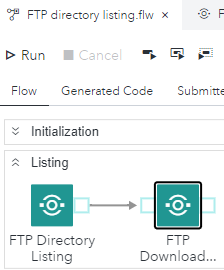
Note that the FTP Directory Listing custom step can be used to generate the input table for this custom step and that the FTP host-, user name- and password settings are defined as macro variables in the initialization step.
Output port

The output tables contains, after running the custom step, six columns:
- source_directory: The directory from which the file is downloaded from.
- source_file: The downloaded file.
- rmv_src_after_dwnld: It stands for 'remove source after download'. The value can be 'Yes' or 'No'.
- rmv_trgt_bfr_dwnld: It stands for 'remove target file before download'. The value can be 'Yes' or 'No'.
- processed_dttm: This is the date and time the file got downloaded.
Note that the table only contains rows for files that got downloaded successfully.
Change Log
Version 1.1 (14AUG2024): Published externally.
Version 1.0 (14APR2023): Initial version. Published internally.