EAC – Query SAS Viya REST API.step
ACCESS THE CUSTOM STEP FOLDER
Description
This custom step allows the user to query SAS Viya applications and services through SAS Viya REST API. The returned data is stored into 4 output datasets : root, links, items, items_links
User Interface
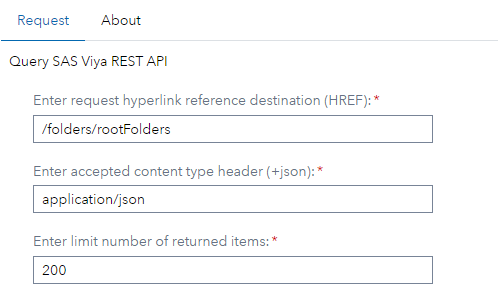
Request
- Enter your request hyperlink reference destination to the SAS Viya ressource that you want to query (HREF):
- The HREF is the REST URL section that typically represents the path to access and interact with a SAS Viya ressource.
- All HREF available for SAS Viya REST API are listed in the SAS REST API guide : https://developer.sas.com/rest-apis.
- Define Accepted Content-Type associated to the GET Request.
- This option is set to application/json by default. Most request will accept this tyoe.
- For more specific Content-Type, refer to the documentation of the GET request.
- The Content-Type must include json.
- Define the limit number of items included in the response. The default value is 100.
Requirements
-
Tested on SAS Viya version Stable 2024.12
-
Uses : SAS REST API (https://developer.sas.com/rest-apis)
Usage
Can be used in a flow or in stand alone.

- 4 datasets are created as output :
- root : root items returned by the request
- links : root links returned by the request
- items (if any) : collection items returned by the request + items self HREF and TYPE
- items_links (if any) : collection items links returned by the request
- If the request generated is not valid, an error is printed to the log and the output is not generated.
Change Log
- Version 1.0 (07FEB2025)
- Initial version